
1. Executive Summary
Quick Migration Path
EnduraData EDpCloud serves as a direct alternative to Repliweb (R1) and Attunity Repliweb for enterprise file synchronization and replication. Unlike rsync or custom scripts, EDpCloud provides the same “many-to-many” distribution topology, automated scheduling, and centralized management that Repliweb users are accustomed to—but with modern compliance and real-time delta replication.
For IT Directors managing legacy infrastructure, the switch is seamless: EDpCloud supports Solaris and AIX while being native to modern Linux kernels, bridging the gap between your legacy data warehouse and modern cloud initiatives.
Key Upgrade: No proprietary scripting required. Supports legacy OSs (Solaris, AIX) and modern Linux distributions (RHEL 9, Ubuntu).
Click here to see more about the migration.
2. Why Replace Repliweb Now?
-
End of Life (EOL) Status: Repliweb has reached EOL and is no longer supported.
-
Security Risks: Repliweb has no support and no software updates. Organizations that continue to use it are at risk of being widely exposed and may violate HIPAA and NIST requirements.
-
Modern OS Support: Repliweb often breaks on newer kernels (RHEL 8/9). EDpCloud is native to them.
-
Ransomware Defense: EDpCloud offers versioning and snapshot isolation schedules to protect data from encryption attacks.
3. Technical Comparison: Repliweb vs. EnduraData EDpCloud
| Feature | Repliweb (Legacy) | EnduraData EDpCloud |
| Status | End of Life (EOL) | Active Development |
| Operating Systems | Legacy Unix/Windows | Legacy Unix (AIX, Solaris) + Modern Linux (RHEL, Ubuntu), Mac, Windows |
| Replication Method | Scheduled / Triggered | Real-Time, Scheduled, or On-Demand (Ad hoc) |
| Security | Proprietary / Older SSL | Default: AES-256 + SSL/TLS |
| Topology | Distribution / Collection | Any-to-Any (Mesh, Bidirectional) |
| Bandwidth Control | Basic Throttling | Dynamic Bandwidth Throttling |
| Migration Path | N/A | Drop-in Configuration (Included with Professional Services) |
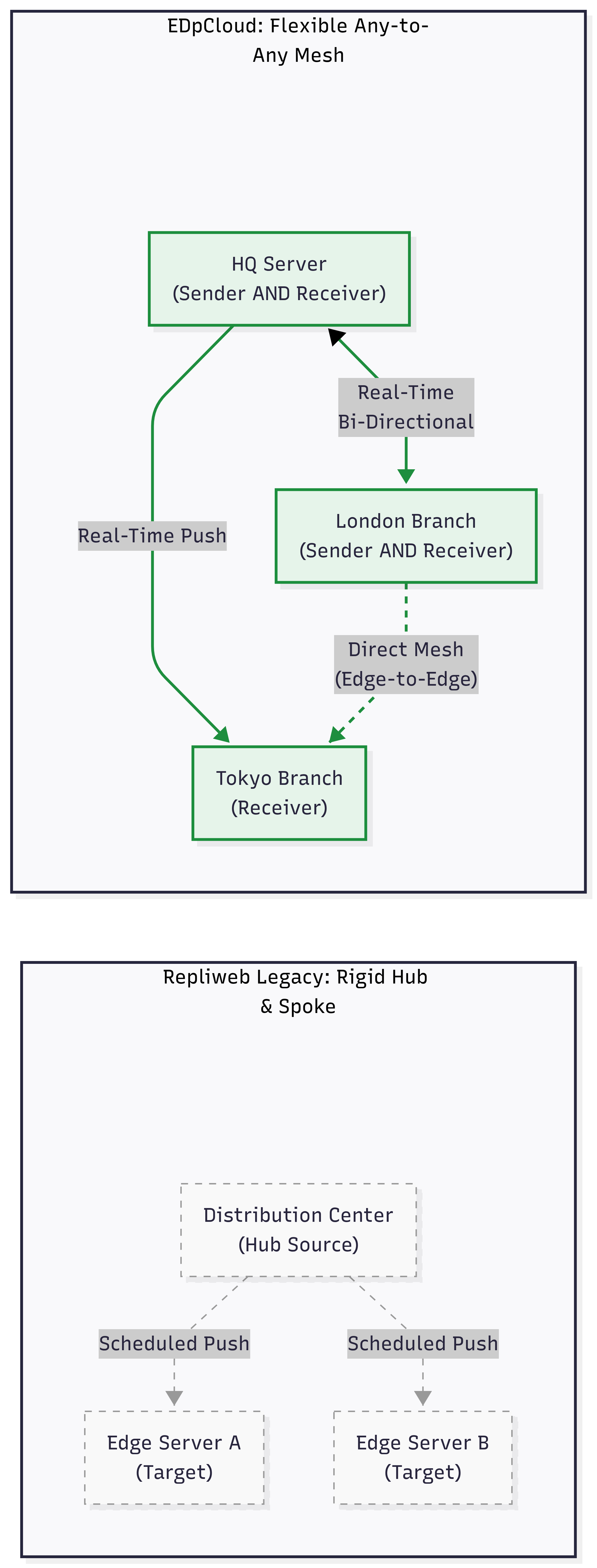
Moving from a rigid Hub-and-Spoke model to a flexible, real-time Mesh topology.
4. Migration Guide: Step-by-Step
Moving from Repliweb to EDpCloud is straightforward. Note: The EDpCloud solution includes professional services to install and configure the software, ensuring a smooth transition.
Step 1: Mapping Your Topology
-
Repliweb Concept: “Distribution Center” vs. “Edge.”
-
EDpCloud Concept: “Sender” and “Receiver” (See
eddist.cfg).
EDpCloud uses the notion of links (replication sets). Each link has one sender and one or more receivers. The eddist.cfg configuration can have many links.
-
A sender can also be a receiver for other links.
-
A receiver can receive data from many senders.
Step 2: Configuring Data Replication
The following is an example of the XML configuration file (eddist.cfg):
<?xml version="1.0" encoding="UTF-8"?>
<config name="simple" password="linkpassword">
   <link name="tokyo">
       <sender hostname="tokyo.enduradata.com" />
       <receiver hostname="london.enduradata.com" storepath="/home/reports/london" />
   </link>
</config>
In the example above, the host tokyo.enduradata.com is the data sender (source). It sends data to the receiver (target) host, london.enduradata.com. The latter stores the data in the directory /home/reports/london.
Step 3: Handling Schedules & Real-Time
Repliweb relied heavily on scheduled jobs.
-
The Scheduler: EnduraData provides a cron-like job scheduler in
edscheduler.cfg. Administrators can also use standard cron to schedule jobs. -
The Upgrade (Real-Time): EDpCloud uses
edfsmonitor.cfgto list directories to monitor in real-time. When files, metadata, directories, or symbolic links change, EDpCloud replicates the changes to one or more remote servers immediately. With real-time replication, entire directory scans and synchronization lag are eliminated.
Step 4: Security & Users
EDpCloud uses multiple levels of security:
-
Hosts allowed to send data (Allow-listing).
- Hosts allowed to receive data
-
Link sender and receiver Passwords.
-
Sender and receiver password file (
edpasswd). -
SSL certificates for data in transit.
- What data can be sent?
- What data can be received?
- Data encrypted in transit
Step 5: Includes and Excludes
Administrators can exclude file or directory patterns from replication using the “excludes” file or restrict what is included using an “includes” file. The format is a list of POSIX regular expressions (one per line).
Preventing Recursion:
One of the most common pitfalls in migrating Linux replications is accidental recursion (replicating /proc or /dev). EDpCloud comes pre-configured with robust regex patterns to prevent system lockups during full-server migrations.
5.1 Example of an excludes file:
^/Volumes$
^/Volumes/.*
^/.*/edpcloud/data/.*
^/.*/edpcloud/logs/.*
^/initrd.img
^/bin/.*
^/boot/.*
^/dev/.*
^/proc/.*
^/sys/.*
^/tmp$
^/tmp/.*
This excludes file saves the sender and receiver from accidentally sending or receiving system files if the storage path is set to root (“/”) for exact mirroring.
5.2 Example of an includes file:
^/home/.*
^/data/tokyo/.*
5. FAQ: Common Engineering Questions
Q: Do I need to rewrite my pre/post-processing scripts?
A: Likely not. EDpCloud supports executing shell scripts before/after transfer via edjob hooks. EnduraData Professional Services will help you migrate all Repliweb configurations to EnduraData EDpCloud during installation.
Q: Does this work on Solaris 10/11?
A: Yes, we maintain binary compatibility for legacy Unix systems often left behind by other vendors.
Q: How do I verify data integrity?
A: EDpCloud performs automatic checksumming. You can also manually audit with edverify, which compares data and metadata between a source and a target.
Ready to Migrate?
Don’t let EOL software compromise your compliance posture.
Looking to modernize other legacy workflows? In addition to RepliWeb, EDpCloud is a proven high-performance Attunity alternative and replacement for organizations running mission-critical workloads on AIX, Solaris, and Linux. Trusted by DoD and SSA.
Or Download the free trial of EDpCloud file replication for Linux and Unix today.

Share this Post